📚
A library that never runs dry
Search and download more than 75,000 public-domain classics right inside the app. Keep them offline and read whenever you like.
Included in every planYour reading space on Android, Windows, iPhone and iPad via the web app. Read EPUBs and PDFs, listen hands-free, discover classics, and connect with fellow readers in Premium Community.
James Clear · 88% read
Find your reading people.
Explore Community ↗BookHive gets out of the way, with thoughtful tools that make every book easier to enjoy.
Search and download more than 75,000 public-domain classics right inside the app. Keep them offline and read whenever you like.
Included in every planNatural text-to-speech keeps your book going while you commute, cook, or rest your eyes.
Choose your type, spacing, size, and theme. Comfortable during the day and gentle after dark.
Keep your personal books on your device. Join Community when you want to share a reading moment, and choose who you connect with.
Back up to your own Google Drive and pick up where you stopped across your devices.
Meet the Community inside BookHive. Share what you’re reading, discover another reader’s next great recommendation, and make a little more room for books in your day.
Optional to join. Available to Premium members inside the app. Internet connection required.

BookHive comes to iOS through the web app. Open it in Safari, add it to your Home Screen, and make your next book a tap away.
A layout that adapts to your iPhone or iPad, with room for the status bar and Home indicator. Tap the center of a book to hide or show navigation on touch screens.
Import from device storage, use Google Drive, or paste a supported book link. Public Drive links support files up to 50 MB; private files require sign-in.
Open the installed web app online and wait for the offline-ready message before disconnecting. Books saved on that device are available for offline reading. Community, downloads and sync need internet.
Explore the real app—from a focused, comfortable reader to your library, highlights, listening tools, stats, and built-in classics.
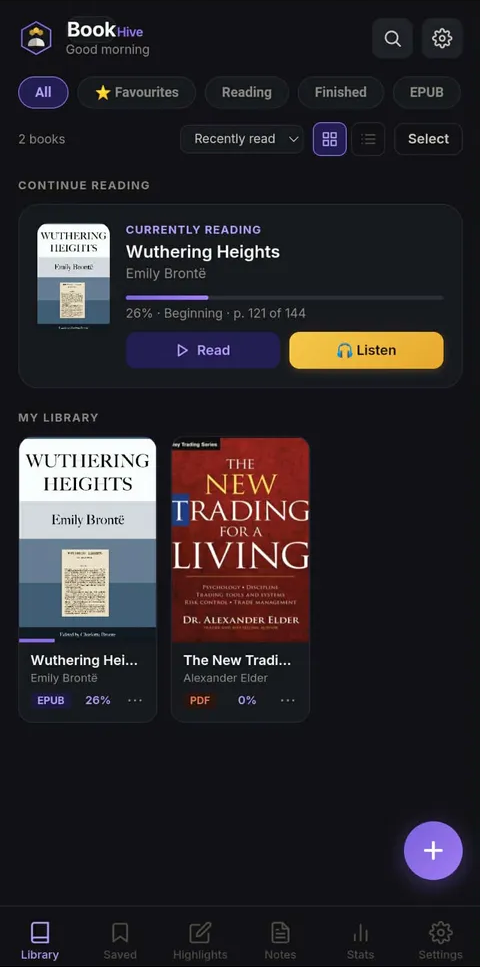
Select an image below to preview it on the left · Use the arrow keys to move through screenshots
Complete one secure payment. Your download links and license key arrive by email.
Install on Android or Windows, or open the web app in Safari on iPhone and iPad. Add it to your Home Screen for quick access.
Import your EPUB and PDF files or discover a classic from the built-in eLibrary.
Pro is free for life.
Premium for ₱99/month.
BookHive Pro is included free for life. Read EPUBs and PDFs, import books, and keep notes and highlights.
Premium adds more: eLibrary, Text-to-Speech and Community for ₱99 per month. Pay one month at a time and renew only when you want to.
₱99 today for one month of Premium.
Pay via QR Ph with GCash, Maya, or a supported banking app.
Access starts when payment is confirmed. Renew manually; no automatic charges. Stop anytime by not renewing.
Cancellation & refund policy
BookHive Pro is free. Refer readers to BookHive Premium and earn 10% of each paid monthly eLibrary subscription, for as long as your referred customers keep paying.
Become a BookHive affiliate →Already an affiliate? Log inAffiliate registration is unlocked only after your BookHive purchase is verified using the same email address that received your app and license.
Everything important before you make BookHive yours.
No. Only BookHive Pro is free for life with this offer. Premium includes eLibrary, Text-to-Speech and Community: pay ₱99 for one month of access. You keep Pro even if you cancel Premium.
Yes. Simply choose not to renew. Premium stays available until your paid month expires, and Pro stays free for life. There are no automatic charges.
Pay ₱99 upfront for one month of BookHive Premium. Your paid month starts when payment is confirmed. Renew manually via QR Ph using the same email. No automatic charges. Stop anytime by choosing not to renew; access continues until expiry. BookHive Pro stays free for life.
Use the Android APK or Windows desktop app, or read on iPhone and iPad through the BookHive web app in Safari. On iOS, choose Share → Add to Home Screen for an app-style experience. iOS access is through the web app, not an App Store download.
Community lives inside BookHive. Opt in to create a reader profile, share book photos and reading posts, react to posts, and connect with other Premium readers. Private messages become available after a connection is accepted. Community requires internet and is included throughout your monthly subscription.
Offline reading requires setup first: open BookHive from its Home Screen icon while online and wait for the offline-ready message. You can then read books already imported on that device. Search, new downloads, Community and cloud sync need internet. Avoid clearing website data if you want to keep locally saved books.
Yes. Import your EPUB and PDF files from device storage or use supported download links. Public Google Drive links support files up to 50 MB through the web download service; private Drive files require sign-in. Links to ordinary webpages are not direct book downloads.
Your imported books stay on your device, with optional Google Drive sync. Community is optional: your reader profile and posts are visible to other Premium Community members, and private messages are shared with your accepted connection.
After payment clears, the download links and your license key are sent to your email. Delivery is usually quick, though manual orders may take up to 24 hours.
Pro is free for life. Premium is ₱99/month. Pay via QR and renew on your terms.
Get BookHive today →Pay ₱99 upfront for one month of BookHive Premium. Your paid month starts when payment is confirmed. Renew manually via QR Ph using the same email. No automatic charges. Stop anytime by choosing not to renew; access continues until expiry. BookHive Pro stays free for life.
Powered by PayMongo · Secure QR Ph payment